













Screen-Free Audio Players for Toddlers: Stories, Listening and Independent Play
Learn how screen-free audio players can fit into toddler play, what to check before buying, and how to support stories, talk and safe listening.
On this page
- What a screen-free audio player does
- How audio can support stories and talk
- Audio play and independent time
- Choosing stories and recordings
- Story cards, buttons and other controls
- Volume, hearing and listening habits
- Screen-free audio and screen time
- Safety checks before buying
- Privacy and connected players
- Comparing common audio options
- Using audio at different ages
- Simple ways to make listening active
- Common mistakes to avoid
- Official guidance across four countries
- Frequently asked questions
- Sources
- Sources
Short answer: A screen-free audio player plays stories, songs or other recordings without showing a video. It can give a toddler another way to enjoy stories. It may also create a calm moment for play. It cannot replace talking, reading together or active play. Children learn from shared attention and back-and-forth talk. Keep listening short enough to leave room for those things.
A player can be simple to use. Some play audio from cards. Others use buttons, a speaker or a phone app controlled by an adult. The right choice depends on your child's age, interests and ability to handle small parts. It also depends on where the player will be used and how you will manage its volume.
There is no need to buy one for every toddler. A library book, a song sung together or a familiar story read aloud can work just as well. If you already own an audio player, use it as one small part of your child's day.
What a screen-free audio player does
A screen-free audio player plays sound without showing pictures on a screen. A recording might be a story, song, rhyme, language lesson or family message. Some players use a removable card to choose a recording. Some have a few large buttons. Others connect to an adult's phone or a home speaker.
“Screen-free” describes what the child sees while listening. It does not mean the device has no screen anywhere. A parent may need a phone or computer to set it up. Check how the player works before you buy. If the child needs an adult's phone for each use, it may not give the simple routine you want.
Players also differ in what they can play. Some work only with recordings made for that player. Others can play audio files chosen by an adult. Check the product details for supported file types, storage and ways to add recordings. Do not assume every player takes every card or file.
Some players need internet access during setup or playback. Others can play stored audio without internet. Check this before buying, especially if you want to use the player while travelling. Read the privacy settings if the player records voice, connects to an account or uses an app.
How audio can support stories and talk
Listening can help a child hear the rhythm of speech and the sounds in words. A favourite story also gives a child chances to remember what comes next. They might repeat a line, name a character or sing a familiar part.
These moments can lead to useful conversation. Pause the recording and ask what your child noticed. Let them answer with a word, a sound, a gesture or a longer sentence. You can add one short idea. For example, “The dog is running. Where is it going?” Then give your child time to reply.
Children do not need to answer questions for every story. They may prefer to listen quietly or move around while the audio plays. Follow their interest. A familiar story can be comforting, even when your child hears it many times.
Audio alone does not show a child what every word means. A story about a bird can make more sense when you look at a bird together. You can point to a picture in a book, watch birds outside or pretend to flap your arms. These shared moments connect words to things children can see and do.
There is no need to treat listening as a lesson. A toddler may learn through play without naming every object. Enjoying the story together matters more than testing what your child remembers.
Audio play and independent time
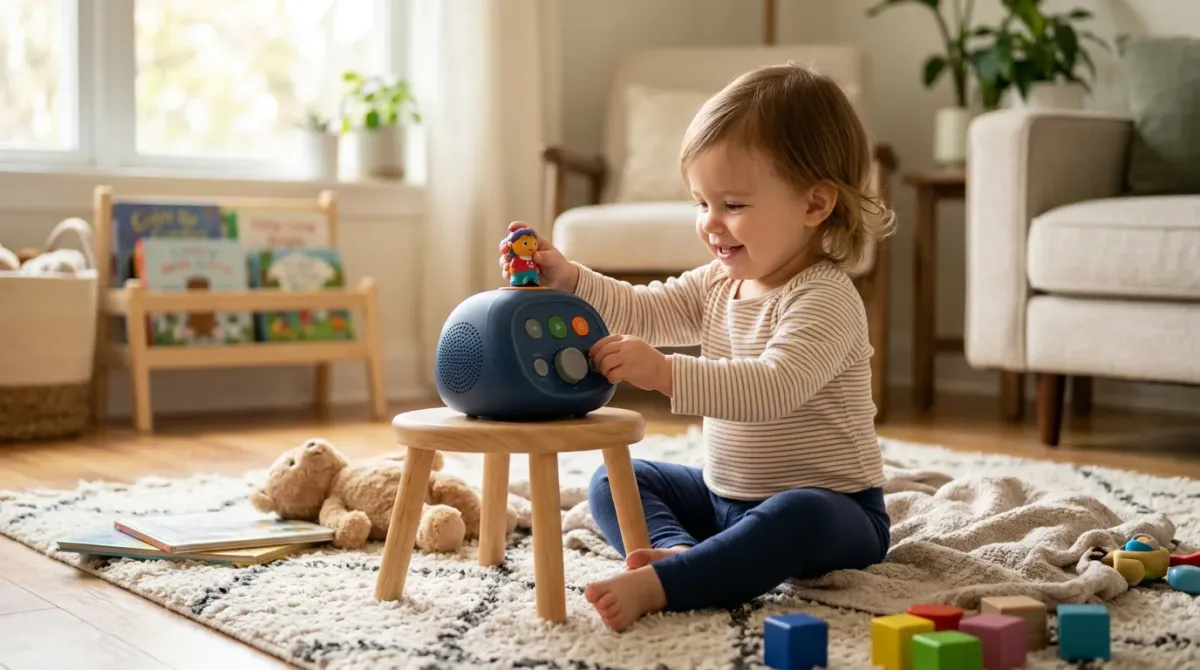
A familiar recording may help a toddler settle into quiet play for a while. They might listen while building with large blocks, drawing with suitable crayons or looking at books. The player is a source of sound. It does not make a child independent by itself.
Start by listening together. Show your child how to start and stop the player. Explain where it belongs when not in use. Then stay nearby while your child tries it. Toddlers still need adults close by, even when they seem busy.
Choose play items that suit your child's age and abilities. Keep small objects, loose batteries, cords and other hazards out of reach. A toddler may carry a player while walking or climb to reach it. Put it on a stable, low surface where it cannot fall onto them.
Some toddlers do not want to use a player alone. That is normal. They may want you to stay, repeat the story or help choose a recording. You can join them, or offer another activity. There is no need to force solo play.
Keep audio from replacing movement, outdoor time, meals, sleep or time with other people. A player can be one option among many. Turn it off when your child is ready for something else.
Choosing stories and recordings
Pick recordings that suit your child's age and interests. Short stories, familiar songs and simple rhymes can be easier to follow than long plots. A toddler may enjoy hearing a known story again. Repeating a favourite is not a problem.
Listen to a recording before offering it. Check its words, sound level and pace. Some stories include loud effects, sudden changes or themes that may upset your child. You know your child best. Stop a recording if they seem worried or uncomfortable.
Look for voices that are clear and easy to hear. A calm voice can make it easier to follow a story. Music and sound effects can be enjoyable, but they do not need to fill every pause. Give children time to think and respond.
Recordings from family members can feel special. Keep messages simple and kind. Do not include private details such as a full name, home address or school name. If the player stores voice recordings online, check who can access them and how to remove them.
Use audio in the languages your family speaks. A child can hear stories in more than one language. You can talk about the story in whichever language feels natural to your family. There is no need to choose between a home language and the language used at childcare or school.
Story cards, buttons and other controls
Story cards can make choosing audio feel hands-on. The child may place a card on the player or insert it into a slot. Check the recommended age and the size of each piece. A card that can fit fully inside a young child's mouth is a choking risk.
Some products have small tokens or figures that control playback. These pieces can be easy to lose. They can also be unsafe for children who still put objects in their mouths. Follow the age label and keep small parts away from younger children in the home.
Large, simple buttons may be easier for a toddler to use. Check whether the child can start, pause and stop the audio without help. If there is a complicated menu, an adult may need to choose the recording. That can still work well for shared listening.
Look at how cards and controls attach. Avoid a setup that leaves long cords within reach. Check for loose pieces, cracks or sharp edges. Stop using a damaged player until it has been checked or replaced.
Volume, hearing and listening habits
Keep the volume low enough that normal conversation nearby remains easy to hear. You should not need to raise your voice over the recording. If the sound seems loud to you, lower it or move the player farther away.
A speaker across the room is often easier to supervise than headphones. Headphones can make it harder for a toddler to hear people, traffic or other sounds around them. They can also make it harder for an adult to notice what the child is listening to.
If you choose headphones, check the fit and volume controls. Use them only with close adult supervision. Do not rely on a product's volume limit as a reason for long listening. Take breaks and watch your child's response.
Turn the player off when it is not being used. Keep it away from the cot or bed during sleep. It should not be placed in a child's sleeping space, where it could become a distraction or a hazard.
There is no single listening schedule that suits every child. Notice whether your toddler still talks, plays and responds to people. If audio regularly interrupts meals, sleep or family time, use it less often or choose another activity.
Screen-free audio and screen time
An audio player does not show video, so it can be an option when you want a break from visual media. It still uses a device and can hold a child's attention. The main question is whether it fits well with the rest of the day.
Raising Children Network in Australia advises families to limit screen time for babies and toddlers. The Canadian Paediatric Society also gives advice on screen use for young children. Those pages discuss screens, not audio players. They do not prove that audio alone improves vocabulary or development.
Use a player in a way that leaves time for play, conversation and rest. Share a story when your child wants company. Turn off the recording when they want to talk or play without it. Do not use audio as a reward or punishment.
If your child is upset, first check what they need. They may want comfort, food, a drink, rest or help. A story may soothe them, but it cannot replace care or attention.
Safety checks before buying
Audio players are electronic products. They are not a special type of baby sleep or medical product. Check the maker's age guidance, warnings and instructions. Look for a clear way to contact the seller or maker if something goes wrong.
- Small parts: Check the size of cards, tokens and covers. Follow the age label. Keep small pieces away from young children.
- Batteries: Find out whether the player uses button batteries or another battery type. Keep spare batteries locked away. Stop using the player if its battery cover is loose or broken.
- Charging: Use the charger and cable listed by the maker. Keep charging cords out of reach. Do not let a child play with a connected cable.
- Heat: Stop using a device that becomes unusually hot, smells odd or shows signs of damage. Follow the maker's charging advice.
- Cleaning: Check which parts can be wiped or washed. Do not put an electronic player in water unless its instructions say this is safe.
- Falls: Place the player on a stable surface. Keep it away from stairs, cot rails and places where it could fall onto a child.
- Recalls: Check official recall advice in your country. Do this before buying second-hand gear and from time to time during use.
Do not assume that a claim such as “non-toxic” or “child-safe” proves a product is safe for every child. Read the instructions and check the actual risks. If the maker gives no clear age guidance or battery information, choose a product with clearer details.
Privacy and connected players
Some audio players connect to an app, account or online library. An adult may need to create an account or share an email address. Check what information the service asks for and whether it collects voice recordings or use details.
Use a strong password for any account. Do not share a child's name, photo or home details in public settings. Check who can see recordings and how to delete them. Turn off features you do not need.
Australian families can read the Department of Home Affairs guidance on security for smart devices. In the UK, the Office for Product Safety and Standards oversees product safety. In the US, the Consumer Product Safety Commission handles consumer product safety. In Canada, Health Canada provides product safety information and recalls.
These bodies have broad roles. Their pages do not give a special certification for toddler audio players. Check the rules and advice that apply where you live. The product maker should provide clear instructions for safe use and account settings.
Comparing common audio options
There is no single best way to play a story. Compare how each option fits your child and your home. Check the actual product instructions before using any device.
| Option | How it works | What may help | What to check |
|---|---|---|---|
| Story player with cards | A card starts a recording. | Choosing a card can feel simple and hands-on. | Card size, age guidance, lost pieces and battery access. |
| Player with buttons | Buttons start, stop or change tracks. | Large controls may be easy to see and press. | Small controls, menu steps and whether an adult must set it up. |
| Adult phone or tablet | An adult selects and plays audio. | It may use stories the family already owns. | Keep the screen away if you want audio only. Set privacy and volume. |
| Home speaker | An adult asks it to play a recording. | It can play audio without a handheld player. | Voice collection, internet needs, privacy and adult control. |
| Book read aloud | An adult reads a printed book. | It gives shared time, pictures and room to talk. | Choose a book your child can handle safely. |
| Singing or storytelling | An adult sings or tells a story. | It needs no device and can change with the child. | Choose a calm time and follow your child's interest. |
When comparing products, check the total cost of cards or recordings. Check whether the audio is included or must be bought separately. Look at the return policy, warranty and repair options. Do not rely on a claim that a device will make a child smarter or more independent.
Using audio at different ages
Children develop at different rates. Use your child's skills and interest, not only their age, to decide what works. A toddler who is not ready to manage a device can still enjoy a story with an adult.
Before a child can use the controls
For a baby or young child, an adult should choose and control the recording. Keep the device out of the cot and away from the child's face. Use a low volume. Talk, sing or read together instead of expecting the child to manage the player.
When a toddler starts exploring
Show the child one simple action, such as pressing play. Stay close and watch how they handle the player. Keep cards and other small parts out of reach if your child mouths objects.
When a toddler can make simple choices
Offer two recordings and let the child choose. Keep the choice simple. If the child changes their mind, help them stop the audio. Give them other ways to spend time, such as books, toys or outdoor play.
As language and play grow
A child may begin to retell parts of a story or sing along. Listen with them when they invite you. Ask a short question, then wait. The child may answer in their own way.
Simple ways to make listening active
Listening can be quiet, but it does not have to be passive. Small actions can connect the story to your child's day. Keep them playful and brief.
- Pause and talk: Stop after a familiar part. Let your child tell you what they heard.
- Act it out: Pretend to walk like a character or make a sound from the story.
- Find the object: Look for something in the room that appears in the story.
- Read along: Use a printed book if you have one. Point to pictures as the recording plays.
- Sing together: Join in with a repeated line or simple song.
- Make your own story: Take turns adding one idea. Stop when your child loses interest.
These ideas are optional. Your toddler may simply want to listen. That is fine. A short, happy moment together is enough.
Common mistakes to avoid
- Expecting a player to teach on its own: Audio can offer words and stories. Children also learn through people, play and daily life.
- Leaving it on all day: Constant sound can make it harder to notice conversation and other sounds. Turn it off when it is not needed.
- Using headphones without close care: A toddler may not hear nearby people or sounds. A speaker at a low level is easier to supervise.
- Leaving cards or tokens out: Small parts can be a choking risk. Put them away after use.
- Putting the player in bed: Keep devices and cords out of the cot or bed. Use stories as part of a calm routine before sleep.
- Assuming every player works offline: Check internet and app needs before a trip or power outage.
- Ignoring privacy settings: Connected products may use accounts or collect information. Check settings before use.
- Forcing independent play: Some children want an adult nearby. Stay with them or offer another activity.
- Trusting broad claims: Be wary of promises about faster speech, better sleep or higher intelligence. A product cannot promise these results.
Official guidance across four countries
There is no special safety standard for toddler audio players listed in the checked source library. General product safety advice still matters. Check local product alerts and the maker's instructions.
| Country | Official body or guidance source | How it relates |
|---|---|---|
| Australia | Product Safety Australia, part of the Australian Competition and Consumer Commission (ACCC); Department of Home Affairs. | Check product recalls and smart device security guidance. Keep batteries and cords away from children. |
| United Kingdom | Office for Product Safety and Standards (OPSS); GOV.UK. | Check product safety information and the government's guidance for smart devices. |
| United States | Consumer Product Safety Commission (CPSC); American Academy of Pediatrics (AAP). | Check product safety and toddler safety advice. Follow age and battery warnings. |
| Canada | Health Canada; Canadian Paediatric Society (CPS). | Check product recalls and child safety guidance. Keep small parts and batteries out of reach. |
These bodies do not say that audio players boost vocabulary. This article makes no such promise. A player can provide stories to hear. Children also need chances to speak, listen and play with other people.
Frequently asked questions
Do screen-free audio players boost vocabulary?
A child can hear words, songs and stories through audio. That alone does not prove that a player will improve language. Talking, reading and playing together give a child chances to hear and use words. Use audio as one small part of those experiences.
Are audio players better than books?
They do different things. A book has pictures and gives an adult and child something to look at together. A player lets a child hear a recording. You can use both, or choose whichever your child enjoys.
At what age can a toddler use a story player?
Follow the maker's age guidance and check whether your child can use its parts safely. Some cards and tokens are too small for young children. An adult can control the player while a child listens.
Can my toddler listen while playing alone?
They can listen during suitable play while an adult stays nearby. Choose safe toys and keep small parts, cords and batteries away. The player does not replace supervision.
Are headphones safe for toddlers?
A speaker at a low level is easier to supervise. Headphones can make it harder for a child to hear people around them. If you use headphones, stay close, keep the sound low and take breaks.
Can I use an audio player at bedtime?
You can play a short story as part of a calm routine. Turn the player off before sleep and keep it out of the cot or bed. Do not leave cords or small parts near the child.
Does screen-free mean no internet?
No. It only means the child does not watch a screen while listening. Some devices need an app or internet connection. Check the setup and privacy details before buying.
Can an audio player replace reading with my child?
No. A recording can play a story, but it cannot respond to your child's words or gestures. Reading together gives you time to pause, point and talk.
What should I do if my child loses interest?
Turn it off and offer another activity. Your child may want to move, talk or play without sound. There is no need to finish a recording.
How should I clean the player?
Follow the maker's instructions. Wipe only the parts that can safely be wiped. Do not wash an electronic device unless its instructions allow it.
Sources
- Raising Children Network – Screen time: babies and toddlers
- Canadian Paediatric Society – Screen time and preschool children
- Product Safety Australia – Recalls
- Australian Department of Home Affairs – Security standards for smart devices
- UK Office for Product Safety and Standards
- U.S. CPSC – Safe sleep: cribs and infant products
- Health Canada – Recalls and safety alerts
- AAP HealthyChildren.org – Safety for your child: 2 to 4 years
Disclaimer: This article is general information. It is not medical advice. Ask your child's health professional if you have concerns about their hearing, speech or development. BabyGearFinder may earn a commission from some links, at no extra cost to you.
Sources
- Raising Children Network – Screen time: babies and toddlers
- Canadian Paediatric Society – Screen time and preschool children
- Product Safety Australia – Recalls
- Australian Department of Home Affairs – Security standards for smart devices
- UK Office for Product Safety and Standards
- CPSC (US) – Safe sleep: cribs and infant products
- Health Canada – Recalls and safety alerts
- AAP HealthyChildren.org – Safety for your child: 2 to 4 years
Related guides
More Parental Tips →
Video Calls with Grandparents: Screen Time for Babies and Toddlers Under Two

Independent Play from Birth to Age Three: How to Support Your Child Without Taking Over
Setting Up a Safe Montessori Floor Play Space: Free Movement Without Container Syndrome
