









Smart Toys for Toddlers: How to Choose Safe, Useful Play Gear
How to pick safe, helpful smart toys for toddlers: screen limits, button battery locks, privacy checks, toy standards in AU, UK, US and Canada, and age tips.

On this page
- Key points
- What makes a toy "smart", and what toddlers actually need
- Types of smart toys for toddlers compared
- How to choose a smart toy that actually helps learning
- Screen time rules for toddlers in Australia, the UK, the US and Canada
- Physical safety: batteries, small parts, magnets and chemicals
- Privacy and cyber safety for connected toys
- Toy safety standards in Australia, the UK, the US and Canada
- Smart toys by toddler age: 12 months to 3 years
- Common mistakes parents make with smart toys
- Frequently asked questions
- Sources
Short answer: The best smart toys for toddlers are simple, sturdy and screen-free. They react when your child presses, pushes or talks. They do not take over the play. Always check for a screw-locked battery door, low volume and real safety marks. Skip toys that need constant internet access or collect your child's voice.
Health and safety advice in this guide comes from official bodies in Australia (ACCC, Raising Children Network), the UK (OPSS, NHS, RCPCH), the US (CPSC, AAP, FCC) and Canada (Health Canada, Canadian Paediatric Society).
Key points
- Keep it hands-on: Pick toys where your toddler does the thinking. Avoid toys that just put on a flashing show.
- Skip screens under age two: Health groups in all four countries advise against screen time for babies and young toddlers, except video chats with family.
- Lock every battery: Coin-shaped button batteries can cause deadly internal burns if swallowed. The battery cover must need a screwdriver to open.
- Guard your privacy: Avoid toys with microphones or cameras that send data online. Turn off Wi-Fi or Bluetooth when you do not need it.
- Check the age label: Toys marked for ages three and up often have small parts. Keep them away from toddlers.
- Play together: No electronic toy teaches speech as well as a real person talking and playing with your child.
What makes a toy "smart", and what toddlers actually need
A "smart toy" is any toy with computer chips, sensors, lights, sounds or an internet link. Some are very simple. You press a button, and a toy animal makes a sound. Others are complex. They connect to Wi-Fi, link to a phone app or answer voice questions.
Toddlers are aged one to three years. At this stage, their brains grow fast. They learn by moving their bodies, touching real objects and copying the people around them. They need to stack blocks, turn book pages, roll balls and hear real human voices.
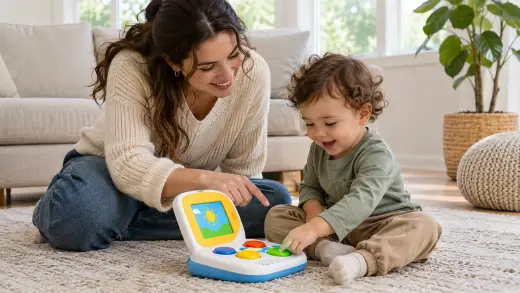
A smart toy can add fun to this kind of play. For example, a simple audio player lets a two-year-old pick a story card and listen. A push-button floor robot lets a toddler press arrows to make it move across the rug.
The problem is that many "smart" toys do too much. They flash bright lights and play loud songs non-stop. Your toddler just sits and watches. Instead of helping your child learn, too much noise and light can tire them out or make it harder to focus.
Active play versus passive watching
Good play is active. Your toddler makes a choice, tests an idea or moves their hands. Passive play means the toy puts on a show while your child stares at it.
Ask yourself one quick question before you buy. Who is doing the work, my child or the toy? If the toy does all the talking, singing and moving, put it back on the shelf.
Types of smart toys for toddlers compared
Smart toys fall into five main groups. Each type suits a different age and has its own risks.
| Toy type | Has a screen? | Needs internet? | Best toddler age | Main good points | Main risks to watch |
|---|---|---|---|---|---|
| Cause-and-effect toys (buttons, flaps, sounds) | No | No | 12 to 24 months | Simple, sturdy, teaches that actions cause results | Can be too loud; check battery door screws |
| Screen-free audio players (story and music boxes) | No | Setup only, then offline | 18 months to 3+ years | Builds listening skills and calm quiet time | Loose story cards or figures must be large enough not to choke |
| Simple push-button robots (early coding toys) | No | No | 2 to 3+ years | Teaches planning, counting and directions | Small wheels or caps coming loose; rechargeable battery heat |
| App-linked or Wi-Fi toys (talking plush, smart dolls) | Sometimes | Yes | 2 to 3+ years | Can update stories or games | Privacy risks, microphones, weak passwords, apps stopping support |
| Kid tablets and screen toys | Yes | Often | Better after age 2 | Can run learning games and video calls | Too much screen time, eye strain, less active play and talk |
For most toddlers, screen-free toys are the safest and best value. They do not break as easily, they do not spy on your home, and they fit health rules for young children.
How to choose a smart toy that actually helps learning
Toy boxes often claim a product will "boost brain power" or "teach early maths". Do not trust the box alone. Look at what the toy actually does when your toddler picks it up.
1. Clear cause and effect
Toddlers love learning that their hands can make things happen. Look for toys with one clear result per action. Press the red button, and a cow moos. Turn the dial, and a light glows softly. Avoid toys where every button plays the same long song.
2. Volume control and gentle sounds
Small speakers right next to a toddler's ear can be very loud. Look for a toy with at least two volume levels and a clear "off" switch. If you hold the toy to your own ear and it feels harsh, it is too loud for a toddler.
3. Room for imagination
The best toys work in more than one way. An interactive toy kitchen or a simple audio box lets your child invent their own stories. A toy that only says "Press the blue circle!" gets boring fast.
4. Tough build and easy cleaning
Toddlers drop toys, bang them on floors and put them in their mouths. Check that the plastic feels thick and smooth, with no sharp seams. Choose toys you can wipe down with a damp cloth. Avoid electronic toys covered in furry fabric that cannot be washed when sick or sticky.
5. No hidden subscription traps
Some smart toys stop working unless you pay a monthly fee or keep an app updated. Check if the toy works 100% offline out of the box. If a company goes out of business, an offline toy still works.
Screen time rules for toddlers in Australia, the UK, the US and Canada
Many smart toys come with small screens or ask you to use a tablet. Health experts in Australia, the UK, the US and Canada give very similar advice on screens for young children.
| Country | Official body | Under 2 years | Ages 2 to 5 years |
|---|---|---|---|
| Australia | Raising Children Network / Dept of Health | No screen time, except video chatting with family | Keep to 1 hour a day or less; sit and watch together |
| UK | NHS / Royal College of Paediatrics and Child Health (RCPCH) | Avoid screens; focus on face-to-face play and talk | Keep screens short; never let screens replace sleep, play or talk |
| US | American Academy of Pediatrics (AAP) | Avoid digital media, except video chat | Limit to 1 hour a day of high-quality programmes, watched together |
| Canada | Canadian Paediatric Society (CPS) | Screen time is not recommended, except video chat | Keep under 1 hour a day; co-view with an adult |
Why do health groups agree on this? Toddlers learn words by watching your face and hearing you answer them. A screen cannot react to your child's smile or answer a random question the way you can.
Also, bright blue light from screens before bed makes it harder for toddlers to fall asleep. Keep screen toys out of the bedroom and turn all screens off at least an hour before sleep.
Physical safety: batteries, small parts, magnets and chemicals
Smart toys have parts inside that plain wooden toys do not. Before handing any electronic toy to a toddler, check these five safety areas.
Button batteries (coin batteries)
Flat, round button batteries power many small light-up toys and sound books. If a toddler swallows one, it can get stuck in the throat and burn through tissue in just two hours. It can be fatal.
- In Australia, the ACCC (Product Safety Australia) enforces strict rules. Any consumer product using button batteries must have a secure, child-resistant battery compartment.
- In the UK (OPSS), the US (CPSC) and Canada (Health Canada), safety groups warn parents to avoid toys where a child can open the battery cover without a tool.
- Always check that the battery door is held shut by a small screw. Tape is not enough.
- If you think a child swallowed a button battery, go to an emergency department right away. Do not wait for symptoms.
Rechargeable lithium-ion batteries
Many modern audio players and toy robots use built-in rechargeable batteries. Fire and Rescue NSW advises parents to buy from trusted brands and only use the charging cable that came with the toy.
- Never charge a toy on a bed, sofa or pillow, where heat can build up.
- Unplug the toy once it is full.
- Stop using the toy right away if it feels hot, swells up, smells strange or hisses.
- Keep charging cords out of reach so toddlers cannot chew or pull them.
Small parts and choking risks
Toddlers explore with their mouths. Any part that can fit inside a small parts test cylinder is a choking danger for children under three. Check for tiny screws, loose battery covers, rubber ear pieces, small game tokens or plastic eyes that could snap off.
If a smart toy is labelled "3+", do not give it to a one- or two-year-old. That label is usually about choking risks, not just how clever the toy is.
High-powered magnets
Some smart building tiles and magnetic story pieces contain small, strong magnets. Both Product Safety Australia and the US CPSC warn that swallowed magnets are a medical emergency. Two magnets inside the tummy can pull together through gut walls and cause severe tears.
Make sure any magnets are sealed tightly inside thick plastic that cannot crack when dropped.
Safe materials and chemicals
Cheap, unverified plastic toys can contain harmful softeners called phthalates or heavy metals like lead. Both the US CPSC and the European Chemicals Agency (ECHA) restrict these chemicals in children's toys. Stick to trusted stores and check for local safety marks.
Privacy and cyber safety for connected toys
Some smart toys connect to your home Wi-Fi or to your phone via Bluetooth. Others have a microphone or a small camera.
If a toy sends voice clips or photos to the internet, strangers could view them if the toy has weak security. Get Cyber Safe (Government of Canada) warns parents to treat connected baby and toddler gear just like a computer or phone.
Governments have also brought in new smart-device security rules:
- Australia: The Department of Home Affairs sets security standards for smart devices, including strong passwords and clear update rules.
- UK: The UK Government's connectable product security rules ban weak default passwords (like "1234" or "admin") and require makers to say how long security updates will last.
- US: The Federal Communications Commission (FCC) runs the U.S. Cyber Trust Mark programme to help shoppers spot safer connected devices.
- Canada: Get Cyber Safe urges families to lock down home Wi-Fi and turn off mics and cameras when not in use.
Quick privacy checklist for connected toys
- Ask yourself if the toy really needs Wi-Fi or a microphone. Often, an offline toy is just as fun.
- Do not enter your child's real full name, birthday or home address into a toy app.
- Change any default password right away to a strong, unique one.
- Turn on two-step sign-in for the parent app if it is offered.
- Switch the toy off completely when playtime ends, not just into standby mode.
Toy safety standards in Australia, the UK, the US and Canada
Real toy makers test their products against strict national standards. These rules check for small parts, sharp edges, strong seams, safe paint and safe batteries. Look for the right standard or mark on the box or manual.
| Country | Main toy safety standard | Safety regulator |
|---|---|---|
| Australia | AS/NZS ISO 8124 (and AS/NZS 8124) | ACCC / Product Safety Australia |
| UK | BS EN 71 (and EN 71) | Office for Product Safety and Standards (OPSS) |
| US | ASTM F963 | Consumer Product Safety Commission (CPSC) |
| Canada | Canadian federal toy safety rules | Health Canada |
Be careful when buying from unknown overseas sellers on large online marketplaces. Some cheap look-alike toys skip safety testing. They may have loose battery covers, toxic paint or weak plastic that shatters. Buy from well-known shops in your own country when you can.
Before you use a second-hand smart toy, search your national recall site. You can check Product Safety Australia, GOV.UK recalls, CPSC recalls or Health Canada recalls-rappels.canada.ca.
Smart toys by toddler age: 12 months to 3 years
Toddlers change fast between their first and third birthdays. A toy that delights a three-year-old can frustrate or endanger a one-year-old.
| Age stage | What your toddler is learning | Best smart toy features | What to avoid |
|---|---|---|---|
| 12 to 18 months | Walking, pointing, basic cause and effect, first words | Big chunky buttons, soft lights, sturdy push toys, simple animal sounds | Small detachable parts, screens, thin plastic, complex voice prompts |
| 18 to 24 months | Naming objects, copying adults, simple pretend play | Interactive play phones or kitchens, sturdy audio story boxes, simple sing-along toys | Screens, fast-flashing games, toys with loose story cards under 3 cm |
| 2 to 3 years | Sorting shapes and colours, short sentences, following simple steps | Push-button floor robots, audio players with story choices, simple letter/number boards | Unsupervised tablets, Wi-Fi toys with open chat or microphones |
12 to 18 months
At this age, toddlers push, bang and chew everything. Pick heavy, rounded toys with large buttons. Simple cause-and-effect toys work best. One press equals one sound. Keep it completely screen-free.
18 to 24 months
Toddlers start pretending. They hold a toy phone to their ear or stir a pot. A smart toy with simple pretend prompts can spark giggles. An audio box you control together is also great for calm afternoon wind-down.
2 to 3 years
Two-year-olds love feeling independent. They can press arrow buttons on a floor robot to send it under a chair. They can choose their own bedtime story on a screen-free audio player. If you do allow a short learning app, sit beside them and talk about what is on the screen.
Common mistakes parents make with smart toys
- Ignoring the "3+" warning: Parents often buy a three-plus toy because their two-year-old is bright. Remember that age labels are about safety, not smarts. A two-year-old can still choke on a small piece.
- Leaving the volume on high: Loud toys stress both kids and parents. Put a small piece of clear tape over a loud speaker grill if there is no volume switch.
- Using smart toys as a babysitter: Even the best electronic toy cannot replace your voice. Toddlers need back-and-forth talk with real people to build language.
- Forgetting to check battery screws: Screws can come loose over time after drops. Check the battery door every month or two.
- Keeping Wi-Fi toys on all night: Never leave a microphone-equipped or camera-equipped toy plugged in inside a child's bedroom.
- Leaving toys in the cot: Smart toys, soft plush toys and hard plastic boxes do not belong in a sleeping space. Keep the cot clear for safe sleep.
Frequently asked questions
Are smart toys better than plain wooden or plastic toys?
No. Plain toys like blocks, balls, dolls and picture books are still the gold standard for toddler play. They let your child lead the game and build hand strength. Smart toys can be a fun extra, especially audio players and simple robots, but your toddler does not need them to learn well.
At what age can a toddler use a screen-based smart toy?
Health bodies in Australia, the UK, the US and Canada advise avoiding screens under age two, except for video calls with family. From age two, keep screen time short, under an hour a day, and sit together to talk about it. Screen-free smart toys are a better pick for toddlers.
How do I check if a smart toy has safe batteries?
Look at the battery door on the back or bottom. It should have a small metal screw holding it shut. If you can slide or pop the cover open with your fingernail, it is not safe for a toddler. Be extra careful with small toys that use flat coin button batteries.
Do smart toys listen to my family all the time?
Most basic smart toys do not have a microphone and cannot record anything. Only toys with voice control, Wi-Fi or app links can listen. If a toy has a microphone, check the privacy policy, turn the mic off when not in use, or choose an offline toy instead.
Can loud musical toys hurt my toddler's ears?
Yes, very loud toys held close to the ear can damage young hearing over time. Always test the toy yourself before wrapping it or handing it over. Pick toys with a volume switch and keep it on the low setting.
What should I do if a smart toy is recalled or breaks?
Take the toy away from your toddler right away. If plastic cracks or a battery door breaks, throw the toy out or recycle the batteries safely. For a recalled toy, follow the recall notice from your national regulator to get a refund or repair.
Sources
- Raising Children Network – Screen time: babies and toddlers
- Product Safety Australia – Button batteries guide
- Australian Department of Home Affairs – Security standards for smart devices
- UK Government – Security rules for smart devices (PSTI)
- NHS (Bedfordshire and Luton Children's Health) – Screen time
- Federal Communications Commission (US) – U.S. Cyber Trust Mark
- Canadian Paediatric Society – Screen time and preschool children
- Get Cyber Safe (Government of Canada) – Cyber security tips for your baby gear
Related guides
More Toys & Play →
Baby and Toddler Play Mats: How to Choose a Safe Mat for Floor Time

From Smart Monitors to High-Tech Toys: A Parent's Guide to Baby Gadgets

Screens and Toddlers: Making Room for Play, Talk and Rest